Hnefatafl

Install
See how to install the software.
Rules
See the rules.
Tournaments
Learn about tournaments.
Artificial Intelligence
Learn about AI.
History
Find out about the history of Hnefatafl.
Translate
If you want to add, update, or fix a translation, open an issue and state what you want to do. If it is a minor change, you can just update the code and submit a pull request.
Help Me
If you have any issues with the software, open an issue on codeberg.
Forum
Here is a forum for Tafl games.
Install
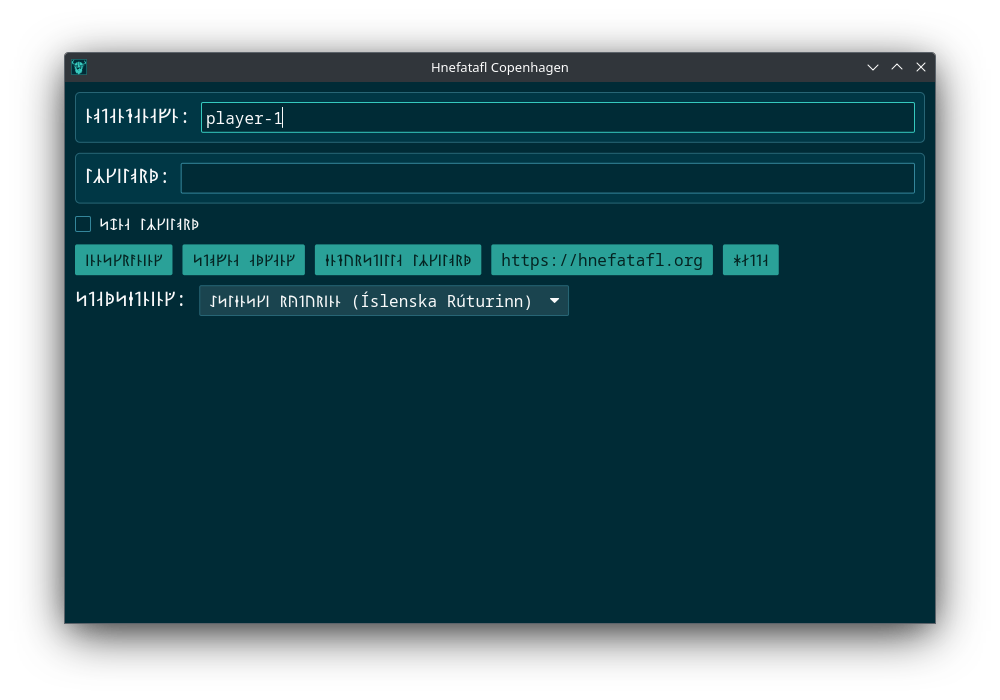
The binaries hnefatafl-ai, hnefatafl-client, hnefatafl-server,
hnefatafl-server-full and hnefatafl-text-protocol are made available from
the Arch, Cargo,
Debian, and Fedora
sources. The Windows and
Flathub sources only provide hnefatafl-client. The
NPM source only provides something akin to
hnefatafl-text-protocol.
On Linux you should run the Flathub client to avoid font issues.
Running the Applications
You can pass --help to any of the following commands to get all of the
runtime options.
You can run the engine with:
hnefatafl-text-protocol --display-game
or you can start a local server:
hnefatafl-server-full
and run a local client:
hnefatafl-client --host localhost
All platforms
You need to install Rust.
Linux Dependencies
On Debian from a fresh installation you need to install clang,
libasound2-dev, libssl-dev, and mold.
On Arch you need clang, alsa-lib, openssl and mold.
On Fedora you need clang, alsa-lib-devel, openssl-devel, and mold.
Cargo 
In your terminal run:
# On Windows pass `--features console` to see console output.
cargo install hnefatafl-copenhagen
Steam 
To run on andriod see GameNative.
Source 
In your terminal run:
git clone https://codeberg.org/dcampbell/hnefatafl.git
Linux
Arch 
In your terminal run:
sudo pacman --sync yay
yay --sync hnefatafl-copenhagen
Debian 
In your terminal run:
echo 'deb [arch=amd64 signed-by=/etc/apt/keyrings/packages.hnefatafl.org.asc] https://hnefatafl.org/apt stable main' \
| sudo tee /etc/apt/sources.list.d/hnefatafl.list
or if using the newer /etc/apt/sources.list.d/debian.sources, add:
Types: deb
URIs: https://hnefatafl.org/apt
Suites: stable
Components: main
Signed-By: /etc/apt/keyrings/packages.hnefatafl.org.asc
Then, Download packages.hnefatafl.org.asc to /etc/apt/keyrings/ or:
wget https://hnefatafl.org/packages.hnefatafl.org.asc
sudo mv packages.hnefatafl.org.asc /etc/apt/keyrings/
Then:
sudo apt update && sudo apt install hnefatafl-copenhagen
Fedora COPR 
In your terminal run:
sudo dnf copr enable dcampbell24/hnefatafl-copenhagen
sudo dnf install hnefatafl-copenhagen
Flathub 
In your terminal run:
flatpak install flathub org.hnefatafl.hnefatafl_client
flatpak run org.hnefatafl.hnefatafl_client
or to see all your options run:
flatpak run org.hnefatafl.hnefatafl_client --help
or under KDE go to:
Application Launcher -> Games -> Hnefatafl Copenhagen
Nix 
git clone https://codeberg.org/dcampbell/hnefatafl.git
cd hnefatafl
sudo nix run
Windows
Chocolatey 
Install Chocolatey.
Then install hnefatafl-copenhagen.
Go to the Start menu and run Hnefatafl.
Android
F-Droid
- Go to Google. Scroll down to
Enhanced Safe Browsing for your account. If it is on, turn it off. - Go to F-Droid and download F-Droid.
- Open F-Droid, go to search, and install
Termux: Terminal emulator with packages. - Open Termux, then run the following:
# Only need to run this once per update.

pkg upgrade
termux-change-repo
pkg install rust git x11-repo
pkg install xfce termux-x11-nightly
git clone https://github.com/termux/termux-packages termux-packages-hnefatafl-copenhagen-dest
git clone -b hnefatafl-copenhagen https://github.com/robertkirkman/termux-packages termux-packages-hnefatafl-copenhagen-src
cp -r termux-packages-hnefatafl-copenhagen-src/x11-packages/hnefatafl-copenhagen/ termux-packages-hnefatafl-copenhagen-dest/x11-packages/
cd termux-packages-hnefatafl-copenhagen-dest
scripts/setup-termux.sh
./build-package.sh -I -f hnefatafl-copenhagen
cd output/
apt reinstall ./hnefatafl-copenhagen*.deb
# Repeat this every time you want to run the program.

export LIBGL_ALWAYS_SOFTWARE=1 DISPLAY=:0
termux-x11 -xstartup xfce4-session &
hnefatafl-client --ascii
Then go to Termux:X11 from the main menu. You may need to hold Termux:11 to
go to the Preferences -> Output, then increase the Display scale %.
NPM 
# With Apache and Firefox on Debian.
sudo npm install -g hnefatafl-copenhagen
sudo mkdir --parent /var/www/html/pkg
sudo cp /usr/lib/node_modules/hnefatafl-copenhagen/ -r pkg /var/www/html
Then load the javascript on a webpage:
cat << EOF > /var/www/html/index.html
<!DOCTYPE html>
<html>
<head>
    <title>Copenhagen Hnefatafl</title>
</head>
<body>
    <h1>Copenhagen Hnefatafl</h1>
    <script type="module">
        import init, { Game } from '../pkg/hnefatafl_copenhagen.js';

        init().then(() => {
            const game = new Game();
            const output = game.read_line_js("show_board");
            console.log(output);
        });
    </script>
</body>
</html>
EOF
See the message protocol for all of the commands available.
# With Apache running.
firefox localhost
Redox @
Edit your user config to include:
[packages]
hnefatafl-copenhagen = "source"
You should be at least using the packages supplied via
include = ["desktop-minimal.toml"]. Go to games and open Hnefatafl or run
/usr/games/hnefatafl-client. After logging in and exiting the application,
you’ll have to restart Redox, because the application is buggy.
There are also at least these bugs:
- There are no CJK fonts.
- On a button press two characters are read in instead of one.
- Backspace does not work.
- I think you have to restart Redox after entering the application, because TcpStream shutdown is not implemented.
Rules
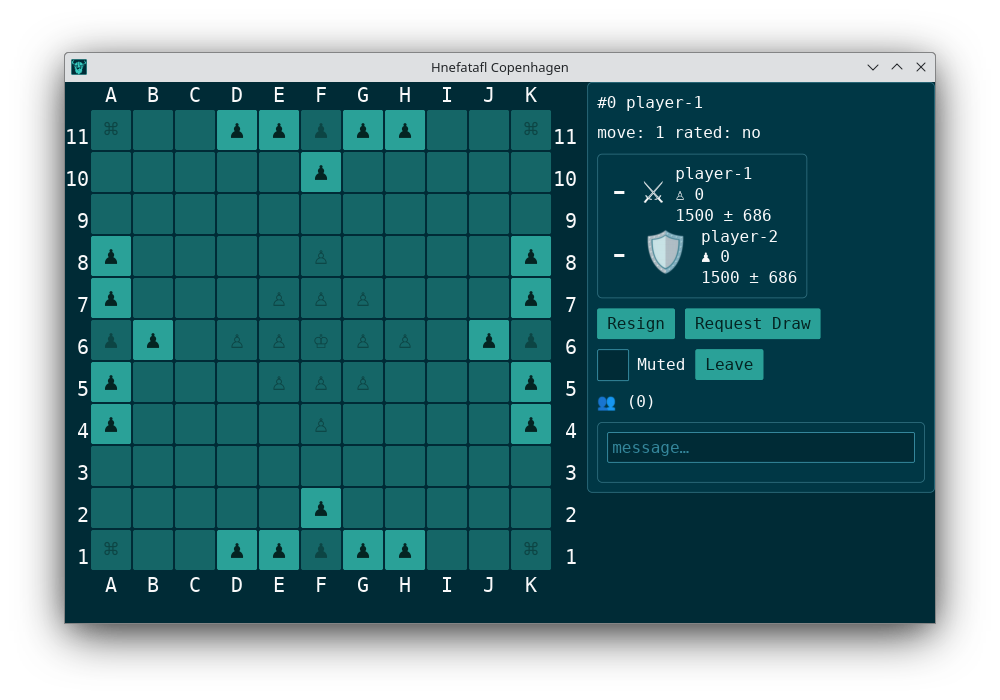
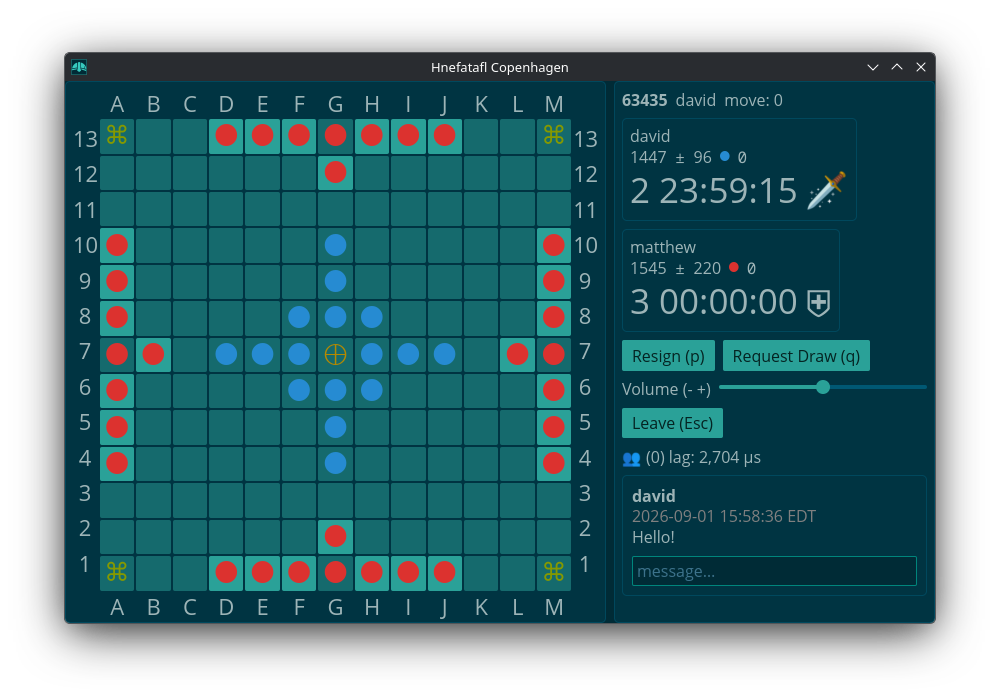
Copenhagen Hnefatafl 11x11, 13x13
A: attackera: captured attackerK: kingk: captured kingD: defenderd: captured defender#: restricted space
1. Starting Board Position
2. First Turn
The attackers move first.
3. Movement
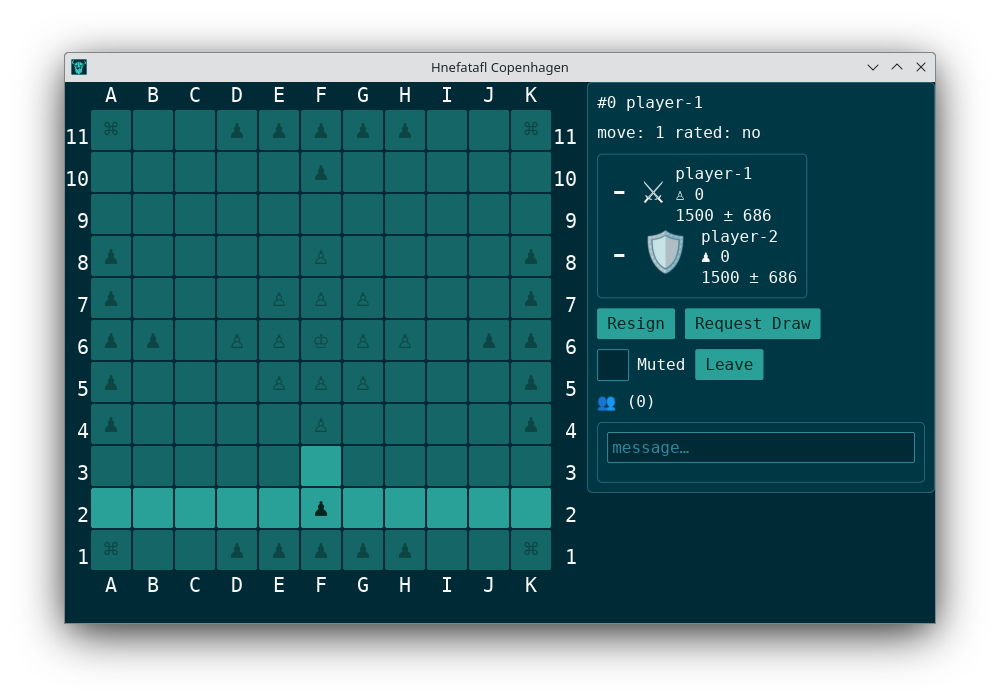
You can move to the edge of the board or another piece orthogonally:
4. Capture
All pieces except the king are captured if sandwiched between two enemy pieces, or between an enemy piece and a restricted square. A piece is only captured if the trap is closed by the aggressor’s move, it is therefore permitted to move in between two enemy pieces. The king may take part in captures.
Captures
  ┌───────────────────────┐ ┌───────────────────────┐
11│ # . . . . . . . . . # │ │ # . . . . . . . . . # │
10│ . . . . . . . . . . . │ │ . . . . . . . . . . . │
 9│ . . . . . . . . . . . │ │ . . . . . . . . . . . │
 8│ . . . . . . . . . . . │ │ . . . . . . . . . . . │
 7│ . . . . . . . . . . . │ │ . . . . . . . . . . . │
 6│ . . . . . # . . . . . │ │ . . . A . # . . . . . │
 5│ . . . . . d . . . . . │ │ . . . d . . . . . . . │
 4│ . → . . . A . . . . . │ │ . A d A d A . . . . . │
 3│ . . . . . . . . . . . │ │ . . . . . . . . . . . │
 2│ . . . . . . . . . . . │ │ . . . ↑ . . . . . . . │
 1│ # . . . . . . . . . # │ │ # . . . . . . . . . # │
  └───────────────────────┘ └───────────────────────┘
  ┌───────────────────────┐ ┌───────────────────────┐
11│ # . . . . . . . . . # │ │ # d A . . . . . . . # │
10│ . . . . . . . . . . . │ │ . . . . . . . . . . . │
 9│ . . . . . . . . . . . │ │ . . ↑ . . . . . . . . │
 8│ . . . . . . . . . . . │ │ . . . . . . . . . . . │
 7│ . . . . . . . . . . . │ │ . . . . . . . . . . . │
 6│ . . ↓ . . # . . . . . │ │ . . . . . # . . . . . │
 5│ . . . . . . . . . . . │ │ . . . . . . . . . . . │
 4│ . . K . . . . . . . . │ │ . . . . . . . . . . . │
 3│ . . a . . . . . . . . │ │ . . . . . . . . . . . │
 2│ . . D . . . . . . . . │ │ . . . . . . . . . . . │
 1│ # . . . . . . . . . # │ │ # . . . . . . . . . # │
  └───────────────────────┘ └───────────────────────┘
    A B C D E F G H I J K     A B C D E F G H I J K
Doesn’t Capture
  ┌───────────────────────┐ ┌───────────────────────┐
11│ # . . . . . . . . . # │ │ # . . . . . . . . . # │
10│ . . . . . . . . . . . │ │ . . . . . . . . . . . │
 9│ . . . . . . . . . . . │ │ . . . . . . . . . . . │
 8│ . . . . . . . . . . . │ │ . . . . . . . . . . . │
 7│ . . . . . . . . . . . │ │ . . . . . . . . . . . │
 6│ . . . . . K . . . . . │ │ . . . . . # . . . . . │
 5│ . . . . . D . . . . . │ │ . D A D . . . . . . . │
 4│ . → . . . A . . . . . │ │ . . . . . . . . . . . │
 3│ . . . . . . . . . . . │ │ . . ↑ . . . . . . . . │
 2│ . . . . . . . . . . . │ │ . . . . . . . . . . . │
 1│ # . . . . . . . . . # │ │ # . . . . . . . . . # │
  └───────────────────────┘ └───────────────────────┘
    A B C D E F G H I J K     A B C D E F G H I J K
Shield Wall
A row of two or more taflmen along the board edge may be captured together, by bracketing the whole group at both ends, as long as every member of the row has an enemy taflman directly in front of him.
A corner square may stand in for one of the bracketing pieces at one end of the row. The king may take part in the capture, either as part of the shield wall or as a bracketing piece. If the king plus one or more defenders are attacked with a shield wall, the attack will capture the defenders but not the king.
  ┌───────────────────────┐ ┌───────────────────────┐
11│ # . . . . . . . . . # │ │ # . . . . . . . . . # │
10│ . . . . . . . . . . . │ │ . . . . . . . . . . . │
 9│ . . . . . . . . . . . │ │ . . . . . . . . . . . │
 8│ . . . . . . . . . . . │ │ . . . . . . . . . . . │
 7│ . . . . . . . . . . . │ │ . . . . . . . . . . . │
 6│ . . . . . # . . . . . │ │ . . . . . # . . . . . │
 5│ . . . . . . . . . . . │ │ . . . . . . . . . . . │
 4│ . . . . . . . . . . . │ │ . . . . . . . . . . . │
 3│ . . ↓ . . . . . . . . │ │ . . . . . . . . . . . │
 2│ . . . D D D . . . . . │ │ . . . . . . . . A A . │
 1│ # . D a a a D . . . # │ │ # . . . . → . A K d # │
  └───────────────────────┘ └───────────────────────┘
    A B C D E F G H I J K     A B C D E F G H I J K
5. Restricted Squares
Restricted squares may only be occupied by the king. The central restricted square is called the throne. It is allowed for the king to re-enter the throne, and all pieces may pass through the throne when it is empty.
Restricted squares are hostile, which means they can replace one of the two pieces taking part in a capture. The throne is always hostile to the attackers, but only hostile to the defenders when it is empty.
The four corner squares are also restricted and hostile, just like the throne. The board edge is NOT hostile.
  ┌───────────────────────┐
11│ # . . . . . . . . . # │
10│ . . . . . . . . . . . │
 9│ . . . . . . . . . . . │
 8│ . . . . . . . . . . . │
 7│ . . . . . . . . . . . │
 6│ . . . . . # . . . . . │
 5│ . . . . . . . . . . . │
 4│ . . . . . . . . . . . │
 3│ . . . . . . . . . . . │
 2│ . . . . . . . . . . . │
 1│ # . . . . . . . . . # │
  └───────────────────────┘
    A B C D E F G H I J K
6. King’s Side Win (Defenders)
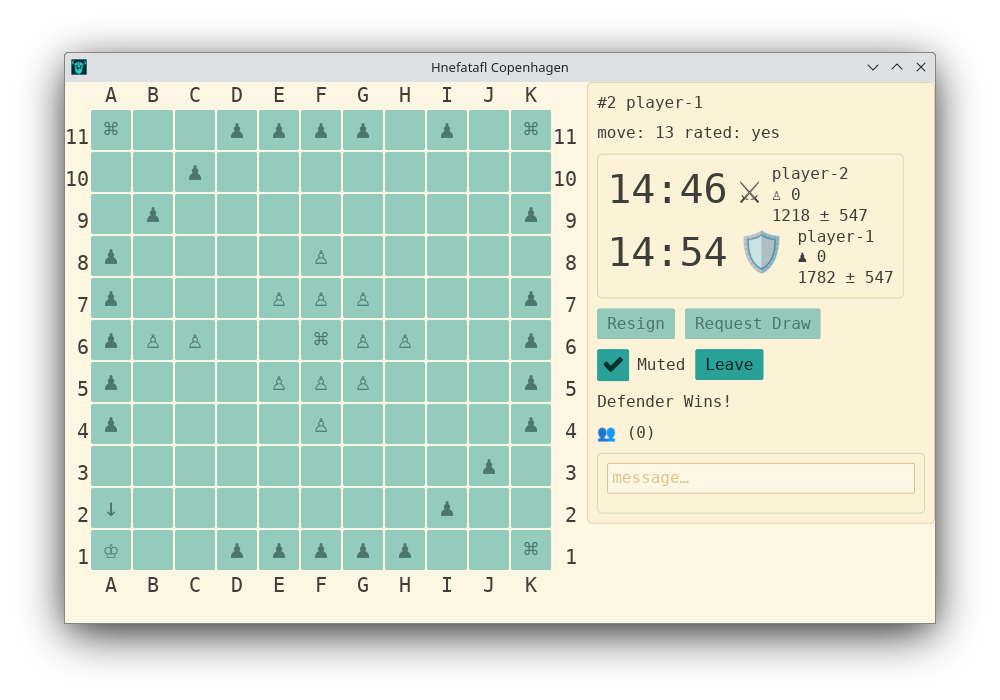
If the king reaches any corner square, the king has escaped and his side wins.
Exit Forts
The defenders also win if the king has contact with the board edge, is able to move, and it is impossible for the attackers to break the fort.
  ┌───────────────────────┐ ┌───────────────────────┐
11│ # . . . . . . . . . # │ │ # . . . . . . . . . # │
10│ . . . . . . . . . . . │ │ . . . . . . . . . . . │
 9│ . . . . . . . . . . . │ │ . . . . . . . . . . . │
 8│ . . . . . . . . . . . │ │ . . . . . . . . . . . │
 7│ . . . . . . . . . . . │ │ . . . . . . . . . . . │
 6│ . . . . . # . . . . . │ │ . . . . . # . . . . . │
 5│ . . . . . . . . . . . │ │ . . . . . . . . . . . │
 4│ . . . . . . . . . . . │ │ . . . . . . . . . . . │
 3│ . . . . . . . . . . . │ │ . . . . D D . . . . . │
 2│ . . . . D D . . . . . │ │ . . . . D . D . . . . │
 1│ # . . D K . D . . . # │ │ # . . . D K D . . . # │
  └───────────────────────┘ └───────────────────────┘
    A B C D E F G H I J K     A B C D E F G H I J K
7. Attackers Win
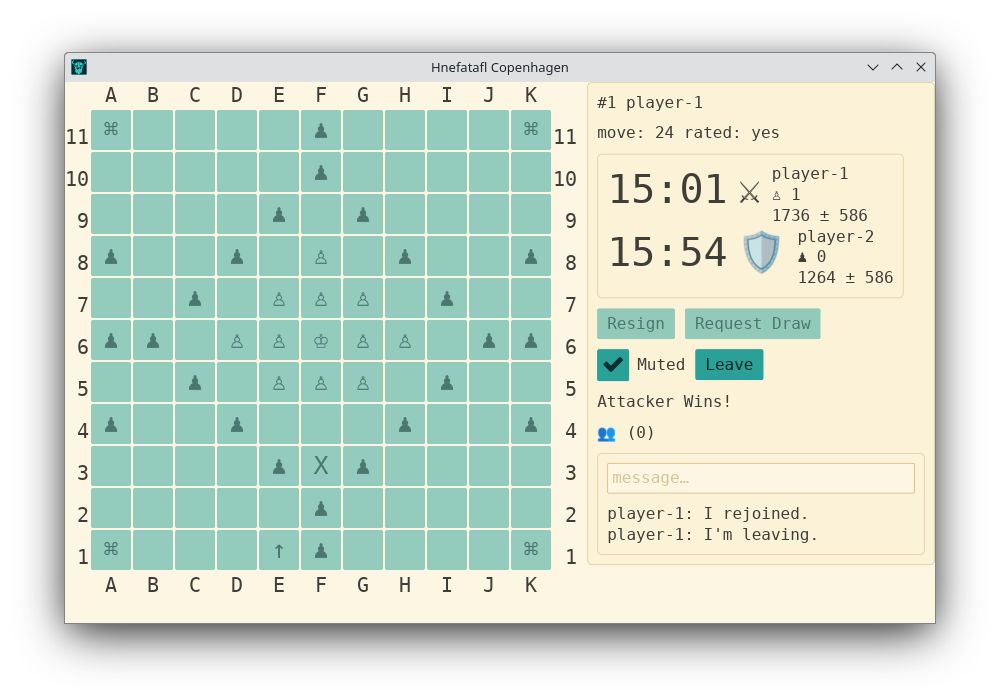
The attackers win if they can capture the king.
The king is captured when the attackers surround him on all four cardinal points, except when he is next to the throne.
If on a square next to the throne, the attackers must occupy the three remaining squares around him and be the one to move.
The king cannot be captured on the board edge.
The King is Captured
  ┌───────────────────────┐ ┌───────────────────────┐ ┌───────────────────────┐
11│ # . . . . . . . . . # │ │ # . . . . . . . . . # │ │ # . . . . . . . . . # │
10│ . . . . . . . . . . . │ │ . . . . . . . . . . . │ │ . . . . . . . . . . . │
 9│ . . . . . . . . . . . │ │ . . . . . . . . . . . │ │ . . . . . . . . . . . │
 8│ . . . . . . . . . . . │ │ . . . . . . . . . . . │ │ . . . . . . . . . . . │
 7│ . . . . . A . . . . . │ │ . . . . . . . . . . . │ │ . . . . . . . . . . . │
 6│ . . . . A k A . . . . │ │ . . . . . # . . . . . │ │ . . . . . # . . . . . │
 5│ . . . . . A . . . . . │ │ . . . . A k A . . . . │ │ . . . . . . . . . . . │
 4│ . . . . . . . . . . . │ │ . . . . . A . . . . . │ │ . . . . A . . . . . . │
 3│ . . . . . . . . . . . │ │ . . . . . . . . . . . │ │ . . . A k A . . . . . │
 2│ . . . . . . . . . . . │ │ . . . . . ↑ . . . . . │ │ . . . . A . . . . . . │
 1│ # . . . . . . . . . # │ │ # . . . . . . . . . # │ │ # . . . . . . . . . # │
  └───────────────────────┘ └───────────────────────┘ └───────────────────────┘
    A B C D E F G H I J K     A B C D E F G H I J K     A B C D E F G H I J K
If the attackers surround the king and ALL remaining defenders with an unbroken ring, then they win, as they have prevented the king from escaping.
The King is Not Captured
  ┌───────────────────────┐ ┌───────────────────────┐
11│ # . . . . . . . . . # │ │ # . . . . . . . . . # │
10│ . . . . . . . . . . . │ │ . . . . . . . . . . . │
 9│ . . . . . . . . . . . │ │ . . . . . . . . . . . │
 8│ . . . . . . . . . . . │ │ . . . . . . . . . . . │
 7│ . . . . . . . . . . . │ │ . . . . . . . . . . . │
 6│ . . . . . # . . . . . │ │ . . . . . # . . . . . │
 5│ . . . . . . . . . . . │ │ . . . . . . . . . . . │
 4│ . . . . . . . . . . . │ │ . . . . . . . . . . . │
 3│ . . . . . . . . . . . │ │ . . . . . . . . . . . │
 2│ . . . . A . . . . . . │ │ . A . . . . . . . . . │
 1│ # . . A K A . . . . # │ │ # K A . . . . . . . # │
  └───────────────────────┘ └───────────────────────┘
    A B C D E F G H I J K     A B C D E F G H I J K
8. Perpetual Repetitions
Deleted Rule
Perpetual repetitions are forbidden. Any perpetual repetition results in a loss for the defenders.
Added Rule
If the defender would repeat a board position, the move is not allowed.
9. Automatic Loss
If a player cannot move, he loses the game.
10. Defenders Can’t Escape, Attackers Win
When the defenders don’t have enough pieces left to make an exit fort, the corners are blocked, and the attackers can move without unblocking a corner.
  ┌───────────────────────┐
11│ # . A . . . . . A . # │
10│ . A . . . . . . . A . │
 9│ A . . . . . . . . . A │
 8│ . . . . . . . . . . . │
 7│ . . . . . . . . . . D │
 6│ A . . . . # . . . . K │
 5│ . . . . . . . . . D . │
 4│ . . . . . . . . . . D │
 3│ A . . . . . . . . . A │
 2│ . A . . . . . . . A . │
 1│ # . A . . . . . A . # │
  └───────────────────────┘
    A B C D E F G H I J K
When only three spaces are left on the side and the defender only has five pieces plus the king left.
  ┌───────────────────────┐
11│ # . A A A . . . A . # │
10│ . A . . . . . . . A . │
 9│ A . . . . . . . . . A │
 8│ . . . . . . . . . D D │
 7│ . . . . . . . . D . K │
 6│ . . . . . # . . . D D │
 5│ A . . . . . . . . . A │
 4│ A . . . . . . . . . A │
 3│ A . . . . . . . . . A │
 2│ . A . . . . . . . A . │
 1│ # . A A A . . . A . # │
  └───────────────────────┘
    A B C D E F G H I J K
When the attackers have all corners blocked and only two spaces left on any side.
  ┌───────────────────────┐
11│ # . . . . A D D A . # │
10│ . . . . A . . . . A . │
 9│ . . . A . . . . . . A │
 8│ . . A . . . . . D D D │
 7│ . . A . . . . . D . K │
 6│ . . A . . # . . D D A │
 5│ . . A . . . . . . . A │
 4│ . . A . . . . . . . A │
 3│ . . . A . . . . . . A │
 2│ . . . . A . . . . A . │
 1│ # . . . . A . . A . # │
  └───────────────────────┘
    A B C D E F G H I J K
It does not count as the side being blocked if the side spaces are not connected
  ┌───────────────────────┐
11│ # . A A A A D D A . # │
10│ . A . . . . . . . A . │
 9│ A . . . . . . . . . A │
 8│ . . . . . . . . D D D │
 7│ A . . . . . . . D . K │
 6│ A . . . . # . . D D A │
 5│ A . . . . . . . . . A │
 4│ . . . . . . . . . . A │
 3│ A . . . . . . . . . A │
 2│ . A . . . . . . . A . │
 1│ # . A A A A . . A . # │
  └───────────────────────┘
    A B C D E F G H I J K
and not if the peices moved away from the wall are not connected to a corner.
  ┌───────────────────────┐
11│ # . A A A A D D A . . │
10│ . A . . . . . . . A . │
 9│ A . . . . . . . . . A │
 8│ . . . . . . . . D D D │
 7│ . . . . . . . . D . K │
 6│ A . . . . . . . D D A │
 5│ . A . . . . . . . . A │
 4│ . A . . . . . . . . A │
 3│ A . . . . . . . . . A │
 2│ . A . . . . . . . A . │
 1│ . . A A A A . . A . . │
  └───────────────────────┘
    A B C D E F G H I J K
When the king is trapped.
  ┌───────────────────────┐ ┌───────────────────────┐
11│ # A K A A . . . . . # │ │ # A K A A . . . . . # │
10│ . A A . . . . . . . . │ │ . . A A . . . . . . . │
 9│ . A A . . . . . . . . │ │ . . A A . . . . . . . │
 8│ . . . . . . . . . . . │ │ . . . . . . . . . . . │
 7│ . . . . . . . . . . . │ │ . . . . . . . . . . . │
 6│ A . . . . # . . . . D │ │ A . . . . # . . . . D │
 5│ . . . . . . . . . . D │ │ . . . . . . . . . . D │
 4│ . . . . . . . . . . . │ │ . . . . . . . . . . . │
 3│ . . . . . . . . . . . │ │ . . . . . . . . . . . │
 2│ . . . . . . . . . . . │ │ . . . . . . . . . . . │
 1│ # . . . . . . . . . # │ │ # . . . . . . . . . # │
  └───────────────────────┘ └───────────────────────┘
  ┌───────────────────────┐ ┌───────────────────────┐
11│ # A A K A A . . . . # │ │ # A A K A A . . . . # │
10│ . . A A . . . . . . . │ │ . . . A A . . . . . . │
 9│ . . A A . . . . . . . │ │ . . . A A . . . . . . │
 8│ . . . . . . . . . . . │ │ . . . . . . . . . . . │
 7│ . . . . . . . . . . . │ │ . . . . . . . . . . . │
 6│ A . . . . # . . . . D │ │ A . . . . # . . . . D │
 5│ . . . . . . . . . . D │ │ . . . . . . . . . . D │
 4│ . . . . . . . . . . . │ │ . . . . . . . . . . . │
 3│ . . . . . . . . . . . │ │ . . . . . . . . . . . │
 2│ . . . . . . . . . . . │ │ . . . . . . . . . . . │
 1│ # . . . . . . . . . # │ │ # . . . . . . . . . # │
  └───────────────────────┘ └───────────────────────┘
  ┌───────────────────────┐ ┌───────────────────────┐
11│ # A K A A . . . . . # │ │ # A A K A A . . . . # │
10│ . . A . . . . . . . . │ │ . . . A . . . . . . . │
 9│ . . A . . . . . . . . │ │ . . . A . . . . . . . │
 8│ . . . . . . . . . . . │ │ . . . . . . . . . . . │
 7│ . . . . . . . . . . . │ │ . . . . . . . . . . . │
 6│ A . . . . # . . . . D │ │ A . . . . # . . . . D │
 5│ . . . . . . . . . . . │ │ . . . . . . . . . . . │
 4│ . . . . . . . . . . . │ │ . . . . . . . . . . . │
 3│ . . . . . . . . . . . │ │ . . . . . . . . . . . │
 2│ . . . . . . . . . . . │ │ . . . . . . . . . . . │
 1│ # . . . . . . . . . # │ │ # . . . . . . . . . # │
  └───────────────────────┘ └───────────────────────┘
    A B C D E F G H I J K     A B C D E F G H I J K
Attribution
The Copenhagen rules were outlined 2012 by Aage Nielsen (Denmark), Adam Bartley (Norway) and Tim Millar (UK). English text and diagrams: Adam Bartley (Norway)
Based on the version that was last updated 2024-12-21.
Brandubh 7x7
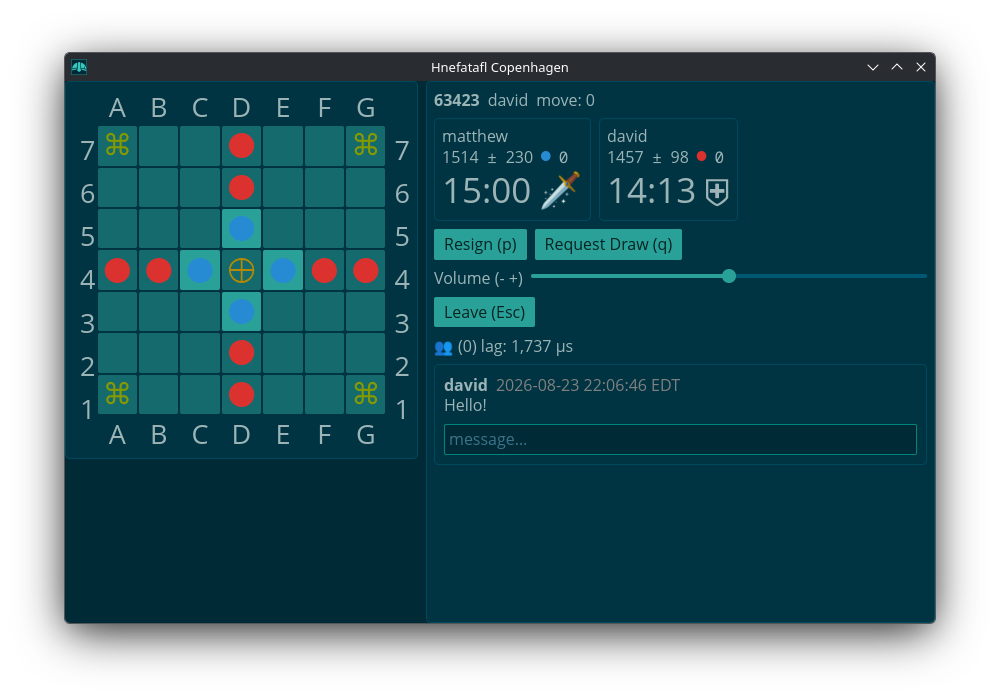
It is the same as above except:
- The defenders go first.
- Off the throne, the king is captured like any other piece.
- The throne is not hostile towards the king.
- Only the king can pass through the throne.
- There are no exit forts.
Tournaments
Tournaments
A game starts when a round starts, having a fischer time of three days main time and six hour increments.
Play continues until a round in which there is only one player left or all
players got the same number of wins, losses, and draws in the last round. A
round is broken up into groups of N players. N being what was passed in the
argument --group-size. The default is four for a maximum of twelve games
played by each player for each round. Play within a group consists of every
player playing every other player once as the attacker (black) and once as the
defender (white).
The players are first sorted by rating with equally rated players being sorted randomly. Then the players are put into groups with highest rated players at one end going down to the lowest rated player. If there is a group left over that is smaller than the group size, the two last groups are split in half. The groups look like this for size three:
3

2 2

3 2

3 3

...
and like this for size four:
4

3 2

3 3

4 3

...
After each round the winner of each group or all the winners in a group if tied go on to play in the next round. If a player is tied for wins, then if they won in fewer moves they are the winner.
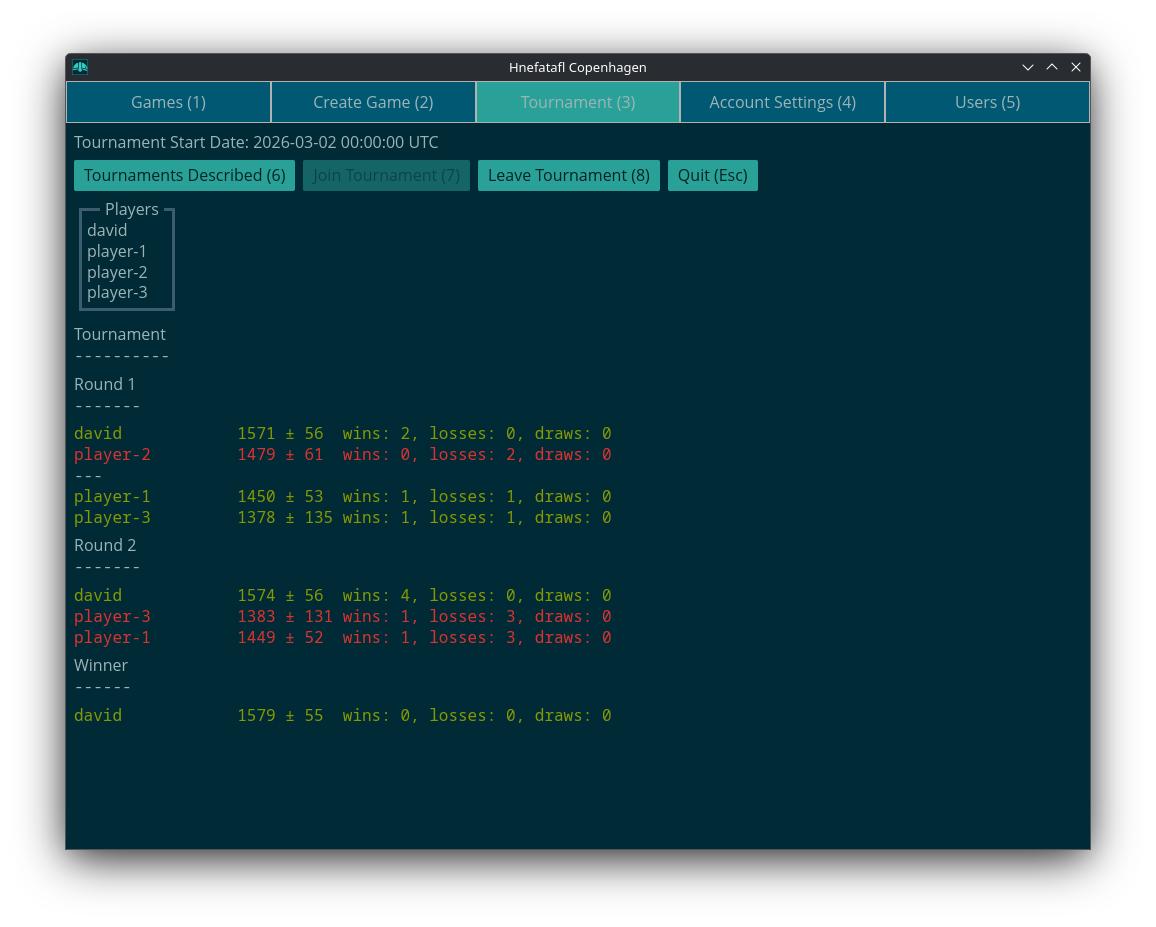
Here is an example screenshot of a played out tournament with group size three:
Artificial Intelligence
Artifcial Intelligence
I adapted TaflZero to my server. It is
based off of AlphaGoZero by Google. You can run it via taflzero on the Arch,
Debian, and Fedora installs, or via the source package. See --help for what
options you can pass it.
You’ll have to create an account for it first on whatever server you will be
running it on. Run hnefatafl-client. Then, Create an account for your AI.
It can also be run as a service. Edit the file
/etc/hnefatafl-ai-attacker.conf or /etc/hnefatafl-ai-defender.conf and add
USERNAME=username
PASSWORD=password
NN=default_nn.onnx
Then run
sudo systemctl start hnefatafl-ai-attacker
or
sudo systemctl start hnefatafl-ai-defender
If you want to change the settings for the AI further, you can edit
/usr/lib/systemd/system/hnefatafl-ai-attacker.service or
/usr/lib/systemd/system/hnefatafl-ai-defender.service and change the value of
ExecStart.
History

From Wikipedia:
Tafl Games
Tafl games (pronounced [tavl]), also known as hnefatafl games, are a family of ancient Northern European strategy board games played on a checkered or latticed gameboard with two armies of uneven numbers. Names of different variants of tafl include hnefatafl, tablut, tawlbwrdd, brandubh, Ard Rí, and alea evangelii. Games in the tafl family were played in Norway, Sweden, Denmark, Iceland, Britain, Ireland, and Sápmi.
Tafl gaming was eventually supplanted by chess in the 12th century, but the tafl variant of the Sámi people, tablut, was in play until at least the 18th century. The rules for tablut were written down by the Swedish naturalist Linnaeus in 1732, and these were translated from Latin to English in 1811. All modern tafl games are based on the 1811 translation, which had many errors.
New rules were added to amend the issues resulting from these errors, leading to the creation of a modern family of tafl games. In addition, tablut is now also played in accordance with its original rules, which have been retranslated.
Hnefatafl
Hnefatafl (sometimes now referred to as Viking chess) was a popular game in medieval Scandinavia and was mentioned in several of the Norse sagas. Some of these saga references have contributed to controversy over the possible use of dice in playing hnefatafl.
The rules of the game were never explicitly recorded, and only playing pieces and fragmentary boards are extant, so it is not known for sure how the game was played. If dice were in fact used, nothing has been recorded about how they were employed. Archaeological and literary sources indicate hnefatafl may have been played on a 13×13 or an 11×11 board.
Hnefatafl became a popular game in Northern Europe during the Viking era (end of the 8th century to 1000 CE), a turbulent time full of conflicts. When chess became a popular game during the Middle Ages, the rules of hnefatafl were forgotten over time. Hnefatafl was particularly popular in Nordic countries and followed the Viking civilization to other parts of Europe, primarily to the British Isles and the Viking country of Garðaríki in what is now part of Russia.
The game developed differently at different locations. Archaeologists have found editions in places such as Ireland and Ukraine. Hnefatafl literally translates to “fist table”, from the Old Norse (equivalently in modern Icelandic) hnef, ‘fist’, and tafl, ‘table’.
Modern Hnefatafl
The rules for Norse tafl were lost, but in the 1900s attempts were made to reconstruct the game based on the rules for the Sámi tafl game tablut. The rules for tablut had been written down in the 1700s, and translated from Latin to English in the 1800s (see § Tablut). Unfortunately, the rules were poorly translated from Latin and gave unbalanced gameplay, mainly due to the mistaken idea that the king must be surrounded on four sides to be captured – instead of two.
Different innovations were made to create a game that favoured the defender side less, such as limiting the king’s escape possibilities to the corners (instead of the entire edge of the board), making the king “weaponless” (unable to participate in capture), making the initial starting points of the attackers inaccessible for the king, and making it easier to capture the king against the corner fields of the board.
Today, many different versions of modern hnefatafl are in play – both online and on physical boards that are sold commercially. One variant used in tournaments is Copenhagen hnefatafl, which also features a “shield wall” mechanism to capture several soldiers at once, and an “exit fort” rule that enables the king to escape on the edge while otherwise being limited to escape in the corners.